 // AI-NATIVE AGENCY
Fonts - ASO Overview Report
·
9 min read
This ASO audit examines how the Fonts keyboard app can improve its App Store visibility through keyword optimization, metadata refinement, and enhanced screenshots to reach top ranking positions.

Fonts stands out among App Store utilities with over 400k downloads in the last 90 days, though it recently dropped 7 positions in its category. Despite strong user engagement, optimization opportunities remain to boost visibility and reach top rankings.
Keyword Research
Analysis reveals both current strengths and untapped potential:
Strong Current Rankings:
"typing" (Search Score 37) - Rank #1
"emoji" (Search Score 52) - Rank #4
"fonts for iphones" (Search Score 55) - Rank #3
"ig" (Search Score 67) - Rank #9
High-Opportunity Keywords:
"art" (Search Score 58) - Currently #48
"writing" (Search Score 40) - Unranked
"maker" (Search Score 33) - #10
"typewriter" (Search Score 25) - #76
Search Score ranges from 5-100, representing relative search volume. Tools like Mobile Action and AppTweak help identify keywords with strong demand and lower competition.
Title
The current title uses only 5 of the allowed 30 characters—a significant missed opportunity.
Recommended Change:
Fonts: Text, Emoji, Keyboards
This incorporates high-value keywords: "Text" (Score 67, Rank #80), "Emoji" (Score 52, Rank #4), and "Keyboards" (Score 36, Rank #1).
Monitor rankings weekly after implementation to track improvement.
Subtitle
Current: Text Font and Emoji Keyboard (28/30 characters)
Recommended Change:
Custom Keyboard & Apple Fonts
Avoid repeating keywords from the title. This variant targets "Keyboard" (Score 60, Rank #1) and "Apple Fonts" (Score 33, Rank #1) without redundancy.
Continuously test subtitle performance and adjust keywords if rankings plateau.
Ratings & Reviews
Current performance is competitive:
Fonts: 4.52 stars (216k+ users)
Fonts Air: 4.71 stars (52k+ users)
Keyboard Fonts ++: 4.56 stars (122k+ users)
Implement reputation management frameworks to intercept negative feedback and encourage positive reviews. Enhance screenshots to showcase value and build credibility through social proof where appropriate.
Screenshots
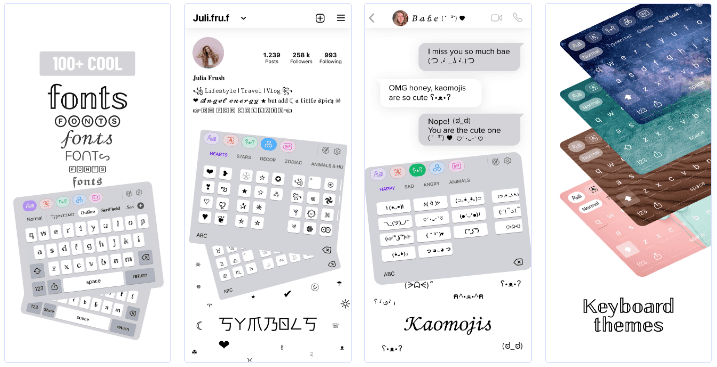
The app currently uses only 4 of 10 available screenshots—substantial room for improvement.
Optimization Strategies:
A/B Testing: Test vibrant lifestyle imagery against vector graphics to identify audience preferences
Color Psychology: Different color schemes impact user perception and behavior
Social Proof: Feature ratings, reviews, or active user counts (respecting App Store guidelines)
Attention Grabbers: Include compelling elements on the first screenshot to differentiate from competitors
Clearly communicate competitive advantages and unique benefits in visual format.
Key ASO Ranking Factors
Apple indexes metadata to determine rankings:
App Title (30 characters max): Most critical ranking factor; prioritize primary keywords
Subtitle (30 characters max): Second most important; add relevant keywords without repetition
Keyword List (100 characters max): Third ranking factor; include relevant terms, brand names, and competitor keywords (hidden from users)

Disclaimer: This audit uses public data only, based on app version 8.0.78 at publication date.